
schema-designer
A lightweight next-gen data explorer - Postgres, MySQL, SQLite, MongoDB, Redis, MariaDB, Elastic Search, and Clickhouse with Chat interface
npx skills add https://github.com/clidey/whodb --skill schema-designerInstallieren Sie diesen Skill über die CLI und beginnen Sie mit der Verwendung des SKILL.md-Workflows in Ihrem Arbeitsbereich.
 WhoDB
WhoDB
Lightweight, Fast, and Beautiful Database Management
















Available on





🎯 What is WhoDB?
WhoDB is the modern database management tool that developers actually want to use.
Built with GoLang and React, WhoDB is a lightweight (<50MB) yet powerful database client that combines blazing-fast performance with an intuitive, beautiful interface. Whether you're debugging a production issue, exploring a new database schema, or managing data for your next feature, WhoDB makes database management feel effortless.
Why WhoDB?
|
🚀 Lightning Fast
🎨 Beautiful & Intuitive
|
🤖 AI-Powered
🔧 Developer-Friendly
|
✨ Key Features
📊 Visual Data Management

|
Spreadsheet-Like Data Grid
|
🔍 Interactive Schema Explorer
|
Visual Schema Topology
|

|
💻 Powerful Query Interface

|
Scratchpad Query Editor
|
🗄️ Multi-Database Support
Community Edition (CE): PostgreSQL, MySQL, SQLite3, MongoDB, Redis, MariaDB, ElasticSearch
Enterprise Edition (EE): All CE databases plus Oracle, SQL Server, DynamoDB, Athena, Snowflake, Cassandra, and more
🎯 Advanced Capabilities
- Mock Data Generation - Generate realistic test data for development
- Flexible Export Options - Export to CSV, Excel, JSON, or SQL
- Advanced Filtering - Build complex WHERE conditions visually
- AI-Powered Queries - Convert natural language to SQL with Ollama, OpenAI, Anthropic, or any OpenAI-compatible provider
🎮 Try WhoDB Now
Experience WhoDB in action without any setup
🌐 Live DemoTry WhoDB instantly with our sample database 
Pre-filled with sample PostgreSQL database |
🎥 Video DemoWatch WhoDB in action 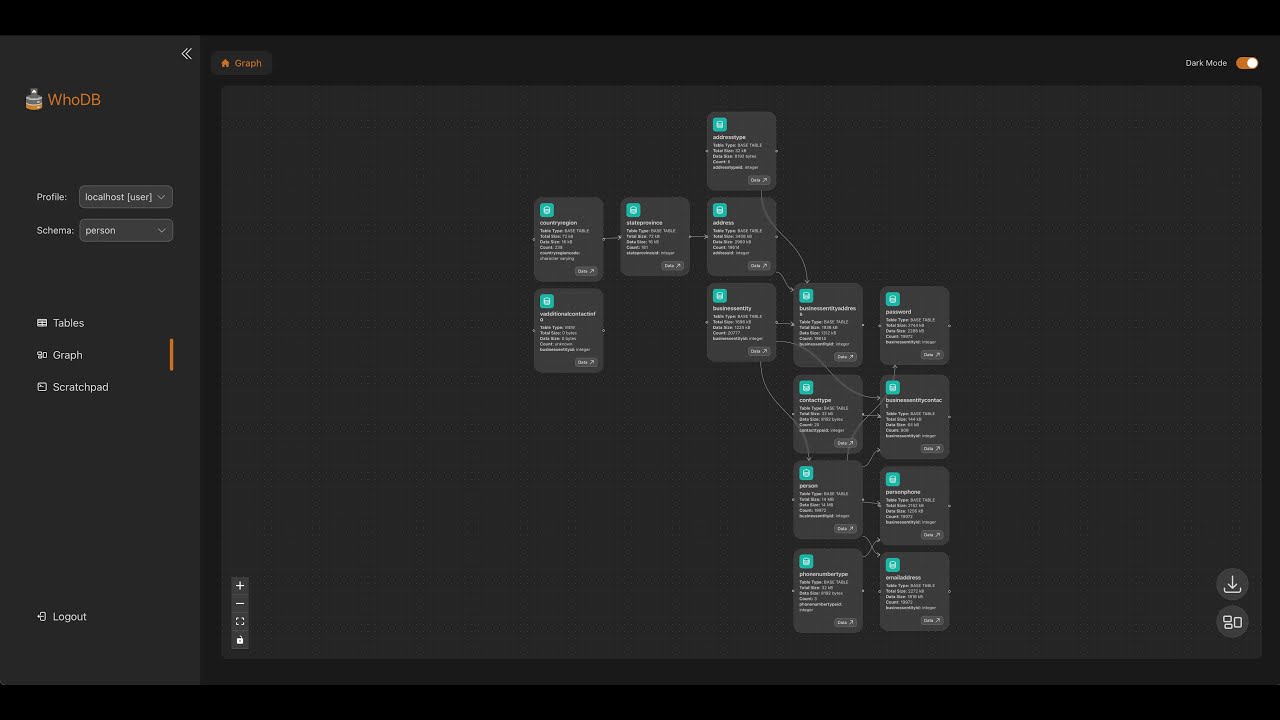
Complete walkthrough of features |
🚀 Quick Start
Option 1: Docker (Recommended)
The fastest way to get started with WhoDB:
docker run -it -p 8080:8080 clidey/whodb
Then open http://localhost:8080 in your browser.
Option 2: Docker Compose
For more control and configuration:
version: "3.8"
services:
  whodb:
    image: clidey/whodb
    ports:
      - "8080:8080"
    environment:
      # AI Integration (Optional)
      # Ollama Configuration
      - WHODB_OLLAMA_HOST=localhost
      - WHODB_OLLAMA_PORT=11434

      # Anthropic Configuration
      - WHODB_ANTHROPIC_API_KEY=your_key_here
      # - WHODB_ANTHROPIC_ENDPOINT=https://api.anthropic.com/v1

      # OpenAI Configuration
      - WHODB_OPENAI_API_KEY=your_key_here
      # - WHODB_OPENAI_ENDPOINT=https://api.openai.com/v1

      # Generic AI Providers (OpenAI-compatible endpoints)
      # Use WHODB_AI_GENERIC_<ID>_* to add any OpenAI-compatible provider.
      # <ID> can be any unique identifier (e.g., LMSTUDIO, OPENROUTER).
      #
      # LM Studio example:
      # - WHODB_AI_GENERIC_LMSTUDIO_NAME=LM Studio
      # - WHODB_AI_GENERIC_LMSTUDIO_BASE_URL=http://host.docker.internal:1234/v1
      # - WHODB_AI_GENERIC_LMSTUDIO_MODELS=mistral-7b,llama-3-8b
      #
      # OpenRouter example:
      # - WHODB_AI_GENERIC_OPENROUTER_NAME=OpenRouter
      # - WHODB_AI_GENERIC_OPENROUTER_BASE_URL=https://openrouter.ai/api/v1
      # - WHODB_AI_GENERIC_OPENROUTER_API_KEY=your_key_here
      # - WHODB_AI_GENERIC_OPENROUTER_MODELS=google/gemini-2.0-flash-001,anthropic/claude-3.5-sonnet
    # volumes: # (Optional for SQLite)
    #   - ./sample.db:/db/sample.db
What's Next?
- Connect to your database - Enter your database credentials on the login page
- Explore your schema - Browse tables and visualize relationships
- Run queries - Use the Scratchpad to execute SQL queries
- Manage data - Edit, add, and delete records with ease
📖 For detailed installation options and configuration, see our Documentation
💻 WhoDB CLI
WhoDB also offers a powerful command-line interface with an interactive TUI (Terminal User Interface) and MCP server support for AI assistants.
Features
- Interactive TUI - Full-featured terminal interface for database management
- MCP Server - Model Context Protocol support for Claude, Cursor, and other AI tools
- Cross-Platform - Available for macOS, Linux, and Windows
Quick Install
# macOS/Linux
curl -fsSL https://raw.githubusercontent.com/clidey/whodb/main/cli/install/install.sh | bash

# Homebrew (coming soon)
brew install whodb-cli

# npm
npm install -g @clidey/whodb-cli
Usage
# Launch interactive TUI
whodb-cli

# Run as MCP server for AI assistants
whodb-cli mcp serve
📖 For full CLI documentation, see the CLI README
🛠️ Development Setup
Prerequisites
- GoLang - Latest version recommended
- PNPM - For frontend package management
- Node.js - Version 16 or higher
Editions
|
Community Edition (CE)
|
Enterprise Edition (EE)
|
📚 See BUILD_AND_RUN.md for detailed build instructions and ARCHITECTURE.md for architecture details.
Frontend Development
Navigate to the frontend/ directory and start the development server:
cd frontend
pnpm i
pnpm start
Backend Development
1. Build Frontend (First-Time Setup)
If the core/build/ directory doesn't exist, build the frontend first:
cd frontend
pnpm install
pnpm run build
rm -rf ../core/build/
cp -r ./build ../core/
cd ..
Note: This is only required once, as Go embeds the
build/folder on startup.
2. Setup AI Integration (Optional)
To enable natural language queries:
-
Ollama - Download from ollama.com
# Install Llama 3.1 8b model
ollama pull llama3.1
WhoDB will auto-detect installed models and show a Chat option in the sidebar.
-
OpenAI/Anthropic - Set environment variables (see Docker Compose example above)
-
Any OpenAI-compatible provider - Use
WHODB_AI_GENERIC_<ID>_*environment variables to connect to LM Studio, OpenRouter, or any provider with an OpenAI-compatible API (see Docker Compose example above)
3. Start Backend Service
cd core
go run ./cmd/whodb
The backend will start on http://localhost:8080
💼 Use Cases
👨💻 For Developers
|
Local Development
|
API Development
|
📊 For Data Analysts
- Run ad-hoc SQL queries quickly
- Export data to Excel for analysis
- Build complex filters visually
- Visualize table relationships
🧪 For QA Engineers
- Generate realistic test data
- Verify database state during testing
- Debug test failures quickly
- Validate data migrations
🛠️ For Database Administrators
- Monitor table structures and indexes
- Manage user data efficiently
- Quick schema exploration
- Emergency data fixes
❓ Frequently Asked Questions
What makes WhoDB different from other database tools?
WhoDB combines the lightweight nature of tools like Adminer with modern UX, powerful visualizations, and AI capabilities. Unlike resource-heavy tools like DBeaver, WhoDB uses 90% less memory while providing a faster, more intuitive experience.
Is WhoDB suitable for production use?
Yes, WhoDB is production-ready and used by thousands of developers. For production environments, we recommend:
- Using read-only database accounts when possible
- Enabling SSL/TLS connections
- Consider Enterprise Edition for audit logging and advanced security features
How does WhoDB handle large datasets?
WhoDB implements several performance optimizations:
- Table virtualization for efficient rendering
- Lazy loading for large result sets
- Pagination controls
- Query result streaming
Which databases are supported?
Community Edition: PostgreSQL, MySQL, MariaDB, SQLite3, MongoDB, Redis, ElasticSearch
Enterprise Edition: All CE databases plus Oracle, SQL Server, DynamoDB, Athena, Snowflake, Cassandra, and more
How do I deploy WhoDB?
WhoDB can be deployed in multiple ways:
- Docker - Single command deployment
- Docker Compose - For production setups
- Kubernetes - For enterprise environments
- Binary - Direct installation on servers
See our Quick Start section for details.
Does WhoDB store my credentials?
No. WhoDB does not store database credentials by default. Connections are temporary and credentials are cleared when you close the browser. You can optionally configure connection profiles stored locally in your browser.
Can I use WhoDB with AI features?
Yes! WhoDB integrates with:
- Ollama - For local, private AI models
- OpenAI - GPT-4 and other OpenAI models
- Anthropic - Claude models
- Any OpenAI-compatible provider - LM Studio, OpenRouter, vLLM, and more via
WHODB_AI_GENERIC_<ID>_*environment variables
These integrations allow you to query your database using natural language instead of SQL.
🤝 Contributing
We welcome contributions from the community! Whether it's bug reports, feature requests, or code contributions, we appreciate your help in making WhoDB better.
How to Contribute
- Report Issues - Found a bug? Open an issue
- Request Features - Have an idea? Start a discussion
- Submit PRs - Want to contribute code? Check our Contributing Guide
- Improve Docs - Help us improve documentation
Development Resources
- Contributing Guide - Detailed contribution guidelines
- Architecture - Understanding the codebase
- Build & Run - Development setup instructions
📸 Screenshots
View More Screenshots
Data Management
Add/Edit Records

Advanced Filtering

Export Options

Schema Graph Visualization

Scratchpad Query Editor

Query Results

Multiple Database Support

🏢 Infrastructure & Support
WhoDB's deployment and CI/CD are powered by Clidey, a no-code DevOps platform.
Contact & Support
- Email: [email protected]
- GitHub Issues: Report a bug
- Discussions: Join the conversation
- Documentation: docs.whodb.com
⭐ Star Us on GitHub!
If you find WhoDB useful, please consider giving us a star on GitHub. It helps us grow the community and continue improving WhoDB.
Built with ❤️ by the Clidey team
"Is it magic? Is it sorcery? No, it's just WhoDB!"