
setup-build-tools
Claude Desktop for Debian-based Linux distributions
npx skills add https://github.com/aaddrick/claude-desktop-debian --skill setup-build-toolsInstallez cette compétence avec la CLI et commencez à utiliser le flux de travail SKILL.md dans votre espace de travail.
Claude Desktop for Linux
This project provides build scripts to run Claude Desktop natively on Linux systems. It repackages the official Windows application for Linux distributions, producing .deb packages (Debian/Ubuntu), .rpm packages (Fedora/RHEL), distribution-agnostic AppImages, an AUR package for Arch Linux, and a Nix flake for NixOS.
Note: This is an unofficial build script. For official support, please visit Anthropic's website. For issues with the build script or Linux implementation, please open an issue in this repository.
⚠️ APT migration notice (April 2026)
The APT/DNF repo moved to
pkg.claude-desktop-debian.dev(#493) — binaries are now served from GitHub Releases via a Cloudflare Worker so they don't hit the 100 MB per-file push cap ongh-pages. DNF users are unaffected. APT users on the legacyaaddrick.github.iosources.list will see a scheme-downgrade error onapt update. One-linesedfix.
Features
- Native Linux Support: Run Claude Desktop without virtualization or Wine
- MCP Support: Full Model Context Protocol integration
Configuration file location:~/.config/Claude/claude_desktop_config.json - System Integration:
- Global hotkey support (Ctrl+Alt+Space) - works on X11 and Wayland (via XWayland)
- System tray integration
- Desktop environment integration
Screenshots
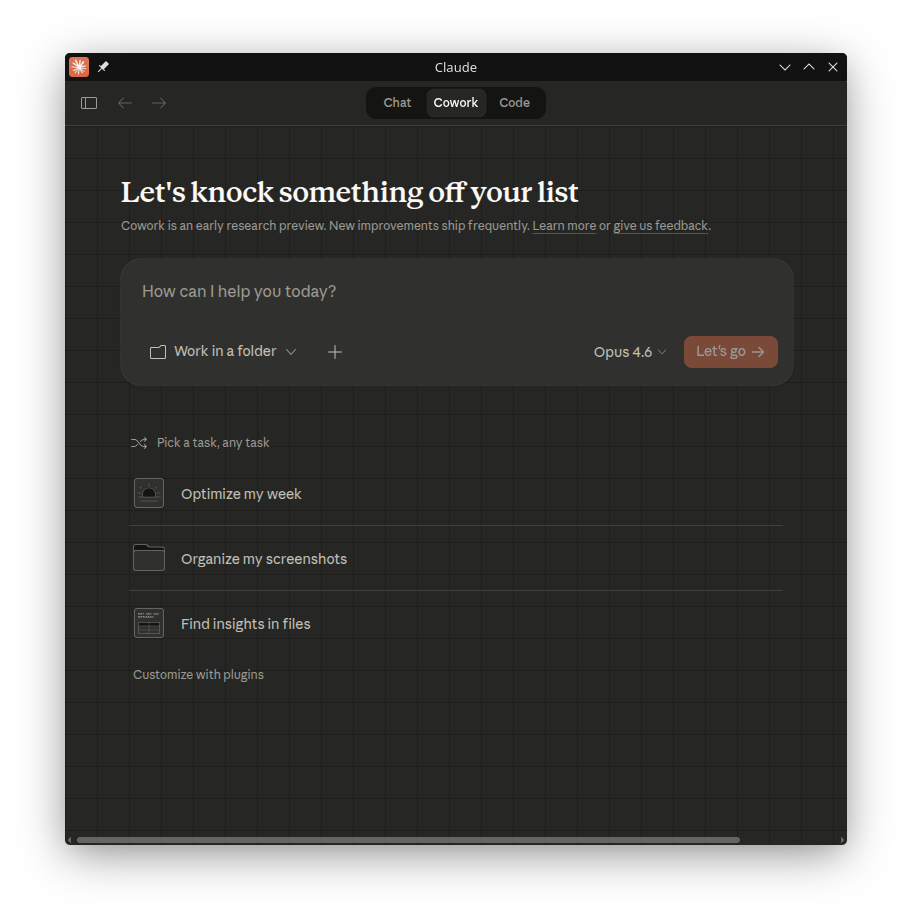

Installation
Using APT Repository (Debian/Ubuntu - Recommended)
Add the repository for automatic updates via apt:
# Add the GPG key
curl -fsSL https://pkg.claude-desktop-debian.dev/KEY.gpg | sudo gpg --dearmor -o /usr/share/keyrings/claude-desktop.gpg

# Add the repository
echo "deb [signed-by=/usr/share/keyrings/claude-desktop.gpg arch=amd64,arm64] https://pkg.claude-desktop-debian.dev stable main" | sudo tee /etc/apt/sources.list.d/claude-desktop.list

# Update and install
sudo apt update
sudo apt install claude-desktop
Future updates will be installed automatically with your regular system updates (sudo apt upgrade).
Using DNF Repository (Fedora/RHEL - Recommended)
Add the repository for automatic updates via dnf:
# Add the repository
sudo curl -fsSL https://pkg.claude-desktop-debian.dev/rpm/claude-desktop.repo -o /etc/yum.repos.d/claude-desktop.repo

# Install
sudo dnf install claude-desktop
Future updates will be installed automatically with your regular system updates (sudo dnf upgrade).
Migrating from the old aaddrick.github.io URL
If you installed claude-desktop before April 2026, your repo config points at https://aaddrick.github.io/claude-desktop-debian. That URL now auto-redirects to pkg.claude-desktop-debian.dev — DNF follows the redirect transparently, but apt refuses it as a security downgrade, so apt update fails. Update your sources list to the new URL:
# APT (Debian/Ubuntu)
sudo sed -i 's|https://aaddrick\.github\.io/claude-desktop-debian|https://pkg.claude-desktop-debian.dev|g' \
  /etc/apt/sources.list.d/claude-desktop.list
sudo apt update

# DNF (Fedora/RHEL) — optional refresh; the old URL still works but pointing directly at the new host is cleaner
sudo curl -fsSL https://pkg.claude-desktop-debian.dev/rpm/claude-desktop.repo \
  -o /etc/yum.repos.d/claude-desktop.repo
Background: binaries for recent releases are no longer committed to the gh-pages branch — .deb files grew past GitHub's 100 MB per-file cap (#493). The new URL is fronted by a small Cloudflare Worker that serves the existing metadata directly and 302-redirects package downloads to the corresponding GitHub Release asset. Bandwidth and package bytes still come from GitHub; the Worker just handles the routing.
Using AUR (Arch Linux)
The claude-desktop-appimage package is available on the AUR and is automatically updated with each release.
# Using yay
yay -S claude-desktop-appimage

# Or using paru
paru -S claude-desktop-appimage
The AUR package installs the AppImage build of Claude Desktop.
Using Nix Flake (NixOS)
Install directly from the flake:
# Basic install
nix profile install github:aaddrick/claude-desktop-debian

# With MCP server support (FHS environment)
nix profile install github:aaddrick/claude-desktop-debian#claude-desktop-fhs
Or add to your NixOS configuration:
# flake.nix
{
  inputs.claude-desktop.url = "github:aaddrick/claude-desktop-debian";

  outputs = { nixpkgs, claude-desktop, ... }: {
    nixosConfigurations.myhost = nixpkgs.lib.nixosSystem {
      modules = [
        ({ pkgs, ... }: {
          nixpkgs.overlays = [ claude-desktop.overlays.default ];
          environment.systemPackages = [ pkgs.claude-desktop ];
        })
      ];
    };
  };
}
Using Pre-built Releases
Download the latest .deb, .rpm, or .AppImage from the Releases page.
Building from Source
See docs/BUILDING.md for detailed build instructions.
Configuration
Model Context Protocol settings are stored in:
~/.config/Claude/claude_desktop_config.json
For additional configuration options including environment variables and Wayland support, see docs/CONFIGURATION.md.
Troubleshooting
Run claude-desktop --doctor for built-in diagnostics that check common issues (display server, sandbox permissions, MCP config, stale locks, and more). It also reports cowork mode readiness — which isolation backend will be used, and which dependencies (KVM, QEMU, vsock, socat, virtiofsd, bubblewrap) are installed or missing.
For additional troubleshooting, uninstallation instructions, and log locations, see docs/TROUBLESHOOTING.md.
Acknowledgments
This project was inspired by k3d3's claude-desktop-linux-flake and their Reddit post about running Claude Desktop natively on Linux.
Special thanks to:
- k3d3
- Original NixOS implementation
- Native bindings insights
- emsi
- Title bar fix
- Alternative implementation approach
- leobuskin for the Playwright-based URL resolution approach
- yarikoptic
- Codespell support
- Shellcheck compliance
- IamGianluca for build dependency check improvements
- ing03201 for IBus/Fcitx5 input method support
- ajescudero for pinning @electron/asar for Node compatibility
- delorenj for Wayland compatibility support
- Regen-forest for suggesting Gear Lever as AppImageLauncher replacement
- niekvugteveen for fixing Debian packaging permissions
- speleoalex for native window decorations support
- imaginalnika for moving logs to
~/.cache/ - richardspicer for the menu bar visibility fix on Linux
- jacobfrantz1
- Claude Desktop code preview support
- Quick window submit fix
- janfrederik for the
--exeflag to use a local installer - MrEdwards007 for discovering the OAuth token cache fix
- lizthegrey
- Version update contributions
- Close-to-tray on Linux to keep in-app schedulers, MCP servers, and the tray icon alive across window close
- "Run on startup" persistence on Linux via XDG Autostart, fixing the toggle that would silently revert
- mathys-lopinto
- AUR package
- Automated deployment
- pkuijpers for root cause analysis of the RPM repo GPG signing issue
- dlepold for identifying the tray icon variable name bug with a working fix
- Voork1144
- Detailed analysis of the tray icon minifier bug
- Root-cause analysis of the Chromium layout cache bug
- Direct child
setBounds()fix approach
- sabiut
--doctordiagnostic command- SHA-256 checksum validation for downloads
- Post-build integration tests for deb, rpm, and AppImage artifacts
- milog1994
- Popup detection
- Functional stubs
- Wayland compositor support
- jarrodcolburn
- Passwordless sudo support in container/CI environments
- Identifying the gh-pages 4GB bloat fix
- Identifying the virtiofsd PATH detection issue on Debian
- Detailed analysis of the CI release pipeline failure caused by runner kills during compare-releases
- Diagnosing the session-start hook sudo blocking issue with three solution approaches
- chukfinley for experimental Cowork mode support on Linux
- CyPack for orphaned cowork daemon cleanup on startup
- IliyaBrook
- Fixing the platform patch for Claude Desktop >= 1.1.3541 arm64 refactor
- Fixing the duplicate tray icon on OS theme change with an in-place
setImage/setContextMenufast-path that avoids the KDE Plasma SNI re-registration race
- MichaelMKenny
- Diagnosing the
$-prefixed electron variable bug - Root cause analysis and workaround
- Diagnosing the
- daa25209 for detailed root cause analysis of the cowork platform gate crash and patch script
- noctuum
CLAUDE_MENU_BARenv var with configurable menu bar visibility- Boolean alias support
- typedrat
- NixOS flake integration with build.sh
- node-pty derivation
- CI auto-update
- Fixing the flake package scoping regression
- cbonnissent
- Reverse-engineering the Cowork VM guest RPC protocol
- Fixing the KVM startup blocker
- Fixing RPC response id echoing for persistent connections
- Configurable bwrap mount points via a dedicated Linux config file
- joekale-pp for adding
--doctorsupport to the RPM launcher - ecrevisseMiroir for the bwrap backend sandbox isolation with tmpfs-based minimal root
- arauhala for detailed root cause analysis of the NixOS
isPackagedregression - cromagnone for confirming the VM download loop on bwrap installs with detailed logs that disproved the initial triage
- aHk-coder for diagnosing the hardcoded minified variable crash in the cowork smol-bin patch
- RayCharlizard
- Detailed analysis of the self-referential
.mcpb-cachesymlink ELOOP bug - Fixing auto-memory path translation on HostBackend
- Fixing the
ion-diststatic asset copy for theapp://protocol handler
- Detailed analysis of the self-referential
- reinthal for fixing the NixOS build breakage caused by the nixpkgs
nodePackagesremoval - gianluca-peri
- Reporting the GNOME quit accessibility issue
- Confirming tray behavior with AppIndicator
- martin152 for detailed diagnosis and a complete patch for three launcher cleanup bugs:
cleanup_orphaned_cowork_daemonself-match,cleanup_stale_cowork_socketsocat dependency no-op, and the same self-match in--doctor - hfyeh for diagnosing the Ubuntu 24.04 AppArmor unprivileged-userns block on Cowork bwrap and contributing the AppArmor profile workaround
- davidamacey for identifying and fixing the XRDP GPU compositing blank-window issue on remote desktop sessions
- pb3ck for diagnosing the Cowork
CLAUDE_CODE_OAUTH_TOKENenv-strip bug with a working reference diff - aJV99 for exporting
GDK_BACKEND=waylandin native Wayland mode to fix XWayland fallback blur on HiDPI displays - Andrej730
- Quick-window regex readability refactor (
String.raw+escapeRegExphelper) - Fixing the visibility-function regex break on Claude Desktop 1.3883.0 (#495)
- Quick-window regex readability refactor (
Sponsorship
If this project is useful to you, consider sponsoring on GitHub.
License
The build scripts in this repository are dual-licensed under:
- MIT License (see LICENSE-MIT)
- Apache License 2.0 (see LICENSE-APACHE)
The Claude Desktop application itself is subject to Anthropic's Consumer Terms.
Privacy
This repository uses an automated triage bot that sends issue contents to Anthropic's API for classification and investigation when you file a bug report or feature request. The bot reads the issue body, title, and any referenced related issues; it does not follow URLs, execute code blocks, or read content outside the triggering issue.
Do not include credentials, tokens, personal data, or anything you wouldn't put on a public issue tracker. If you post sensitive content and then edit it out, the bot's original read is preserved as a run artifact for audit — GitHub's UI hides the edit, but the bot's view of what you wrote is recoverable by maintainers.
Full design and data inventory: docs/issue-triage/README.md.
Contributing
Contributions are welcome! By submitting a contribution, you agree to license it under the same dual-license terms as this project.